Bagaimana cara mendapatkan uang dari internet melalui website gratisan blogspot website gratisan atau blog gratisan blogspot adalah blog yang dimiliki oleh google yang mana kita tahu sekarang google merupakan anjing terbesar yang ada di dunia kedua setelah yahoo search engine. Blogspot merupakan platform blog atau website yang sangat mudah untuk kita gunakan platform platform blogspot ini yang mirip dengan wordpress namun dalam blogspot kita tidak diharuskan menginstal setting beberapa macam settingan yang kita biasa yang paling penting adalah bagaimana kita selalu baru yang kira kira bisa mendapatkan pembaca atau pengunjung yang tertarik untuk mempelajari suatu tulisan yang kita buat di dalam blogspot ada beberapa hal yang harus diperhatikan ketika menulis artikel yang pertama yang paling penting adalah kita pastikan bahwa artikel yang akan kita tulis adalah artikel yang dan original bahwa kita tidak mencontoh dari blog yang kedua adalah bagaimana kita mendapatkan topik yang sesuai sehingga di dalam 1 blok berisi atau beberapa topik yang saling berhubungan sehingga ini akan sangat berpengaruh terhadap pengunjung yang tertarik membaca artikel yang ada di dalam blog dibutuhkan waktu sekitar 1 minggu atau paling cepat 2 hari untuk kita mendaftarkan blog kita sehingga bisa mendapatkan uang cara pendaftaran untuk mendapatkan uang yaitu dengan melalui blogspot dengan melalui adsense adalah program yang digunakan untuk para pemilik para penulis blog para pembuat aplikasi dan mesin pencari manual website proses pendaftaran blogspot sangat mudah blogspot ini merupakan proses tersebut blogspot langsung bisa dilakukan yang harus anda lakukan adalah menu tuangkan dalam dalam bahasa inggris anda tinggal memasukkan data data diri anda kemudian kita untuk penilaian dari google jika menurut google website kita sudah sudah berhak mendapatkan atau kita maka kita akan mendapatkan email dari google menyatakan bahwa kita sudah siap anda bisa menggunakan adsense pada blogspot atau website kita.
Tampilkan postingan dengan label adsense. Tampilkan semua postingan
Tampilkan postingan dengan label adsense. Tampilkan semua postingan
Google Adsense Publisher Toolbar
By
//
Tidak ada komentar:
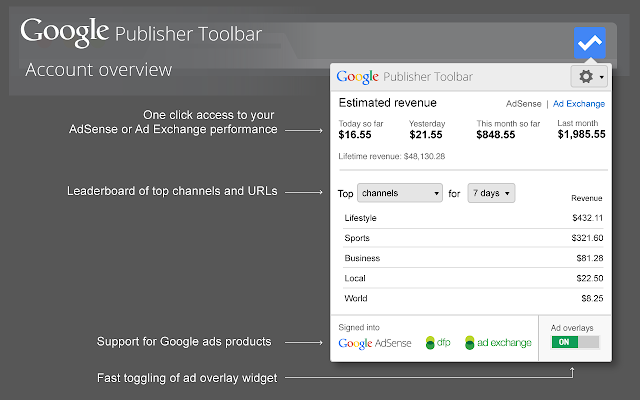
Google Adsense Publisher Toolbar
View data on your AdSense, Ad Exchange, and DoubleClick for Publishers ads and accounts, and block unsuitable ads on your site.
Whether you're using AdSense, Ad Exchange or DoubleClick for Publishers, with the Google Publisher Toolbar you can view information on each of your Google ads, block unsuitable creatives, and see an account overview, all while browsing your own site. The Google Publisher Toolbar adds an overlay to each of your Google ads, which provides some basic information about the ad, including its size, display URL and the advertiser name. Clicking on the overlay generates an Ad Details pop-up with more detailed data including: • A link to the ad’s landing page, allowing for safe clicks. • Summary reporting on the ad unit including performance metrics, such as clicks, RPM and estimated revenue. • The buyer name. • The display URL. From the Ad Details pop-up, you can also take action on an unwanted creative to block the ad, the URL or the ad network, or send feedback to Google. Clicking on the Google Publisher Toolbar icon generates the Account Overview pop-up that provides a helpful summary including: • An estimated account earnings summary for today, yesterday, this month or last month. • The top five channels or top five sites in descending order of revenue for today, yesterday, 7 days, this month and last month. With the Google Publisher Toolbar, you get an easily accessible account overview and enhanced insight into the ads on your page, together with the ability to manage creatives, without ever leaving your site. By installing this extension, you agree to the Google Terms of Service and Privacy Policy at https://www.google.com/intl/en/policies/. ----- New in 5.0.5 - DFP line item rate: The "ad details" view and the exported file now include the DFP Line Item rate. New in 5.0.4 - Export ad details: The "ad details" view now includes a convenient link to export all details associated with an ad into a single downloadable HTML file. New in 5.0.2 - Support for multiple AdExchange accounts: if you manage multiple AdExchange accounts you can pick the desired account from the account overview. New in 5.0.1 - Support for "Rules" for AdExchange publishers: AdExchange publishers can now see the winning bid rule for a given impression. New in 5.0 - Analytics integration functionality displayed in the account overview, providing up-to-date insights on site performance, visitor behavior, demographics and traffic sources. You can access this new data directly from your pages when viewing them on Chrome. More information can be found in our Help Center: https://support.google.com/adsense/answer/6050497 New in 4.3.0 - 'Ads on this page' section added to the Account Overview popup, providing a summary of all Google ads. Scroll to a specific ad by clicking on the bullseye icon or open an "Ad Details" window directly from the popup. New in 4.2.1 - Improved support for DART and GPT tags. - Minor bug fixes and additional error messages.New in 4.2.0 - Full support for DoubleClick for Publishers tags including GPT, SRA and DART, excluding legacy GAM tags - Ability to log in to AdSense, AdExchange and DFP accounts simultaneously - Ability to switch between AdSense and AdExchange account overviews - Icons for AdSense, AdExchange and DoubleClick for Publishers identifying signed-in status - Accounts, Sites and Help links moved to the new Settings menu - Increased prominence of Ad Overlays toggle - Headings added to the Ad Inspector to distinguish information sources New in 4.1.1 - Improved overlay experience for sub-domains - Minor UI and usability fixes and improvements, including error message when extension has not initialized New in 4.1.0: - AdSense lifetime revenue is back! - Added support for timezone reporting - Toggle to enable/disable overlays - Miscellaneous bug fixes, improvements to authentication and minor UI improvements New in 4.0.6: - Display of the Ad Exchange ad network when applicable. New in 4.0.4: - We recently enabled ad overlays on all pages across the Web with the Toolbar, but heard your feedback that you'd prefer to control the sites where the overlays appear. We've now brought back the Settings page, where you can enter the sites on which to enable ad overlays. Unfortunately, previously-entered settings can't be restored, but to help you get started, when you sign in for the first time after downloading or upgrading the Toolbar to v4.0.4, we populate the "Sites authorized to show ad overlays" list with some of the top sites associated with your account. You can access and edit this list at any time by clicking on the gear icon in the Toolbar. - Toolbar icon now indicates signed in/signed out status. New in 4.0: - Complete visual refresh of the account overview, Ad Details window and ad overlays - Improved authorization mechanisms to address reported sign-in issues - Display of ad network in the Ad Details window - Ability to block by ad buyer from the Ad Details window - New field for feedback comments - Miscellaneous small bug fixes
Ebook, Super google Adsense, For Super Advertiser
By
//
Tidak ada komentar:
Why is Google Adsense?
Google Adsense is ranked first that I recommend in My online business portfolio for you.
Why?
The first factor is the most encouraging me to recommend GoogleAdsense is a very good reputation until this moment. already there counted umpteen number ppc fallen one by one and make the publisher or its advertisers pushed in disappointment. Medium Google Adsense to
The second is to be the number wahidnya ppc. That is why this program is very satisfy the advertiser and publisher. In connection with the payment, I never heard anyone complain that they are not paid in time which are determined by Google. So there will be no problems about the payment.
Complaints I always hear and read on the web, or forum come from publisher whose accounts have been suspended or banned for various offenses and click fraud. It just means the Google AdSense team just does the job they are all publishers must comply with although there are many cases of claims that the punishment given to those who can not be justified. but this
rare occurrence and you always can contact Google about Google account AdSense you if there is a problem. In essence, we must strictly follow the program Google AdSense if we want to remain in this lucrative business.
With Google Adsense all websites can easily advertise Adsense, even a Blog can also display Adsense ads. I have some Google Adsense advantages, including:
1. No special experience required.
GogleAdsense Program offers the opportunity to get Dollar to each owner of the blog. The most important requirement is that you must have Website or Blog (your website should be subject to the discretion of the Adsense Program ). You do not need to know anything about advertising, just follow what GogleAdsense provide you will be able to design and start advertising into your blog. So no special ability to design the script, you just simply follow what is provided google.
2. No need to advertise.
When a blog already has nlai sell it on its own blog will have high traffic, this means that your blog will be the engine advertisers very tough. However, obtaining visitors is not easy. you
must have patience and interesting content for your blog has a "repeat visitor "high. However, the blog owner can GoogleAdsense start earning from day one to join. When traffic blog
your income increases, you will definitely follow.
3. Easy Customisized
System Google Adsense is basically a tool control to display
ads on various blogs that exist. Of course, the blog owner can arrange their own ads
ads are shown both shape and color.
4. Contextual Adversiting
Google Adsense provides targeted advertisements (Constextual Adversiting) "all
ads will only be shown disebuah blogs that have content / content appropriate
with the keywords that have been selected by the advertiser ". This system will not be
found in other advertising programs. This is a method of "win win situation"
both for advertisers and blog owners. Someone who visits a
blogs that contain advertising GoogleAdsense will see ads that match
product / service / topic discussed in the blog. They may be interested
with the product or service offered through advertising GoogleAdsense. so that
blog visitors also have the option to search for a product or service through
The Adsense adverts had.
5. Real-time Revenue.
GoogleAdsense also be responsible for all of your income
get through your blog. You can log in to the account GoogleAdsense and
check your earnings anytime and anywhere (realtime earnings).
So, GoogleAdsense is a program that is very easy to dipalikasikan
into the blog and earn income. Very interesting is not it?
Google Adsense TOS
To become adsense publisher, you must obey the rules and regulations
Google has been set. Many common mistakes are always made by the bloggers
in their efforts to earn dollars through Google Adsense. Avoid 15 things
which violate the rules of Google Adsense below:
1. Never click your own ads in any way
Rules of the most widely violated by adsense publishers, with penalties
banned from Google which reached 70%. This is (probably) happen because you want
try their system by clicking on your own ads. For those who test
system, can be categorized as those who provide accidental clicks,
there are ways to help you not banned by Google, which is the
Discover NEW WAY For Men-JACK-UP
Your Adsense Earnings!
www.cafeadsense.blogspot.com
All Rights Reserved 2010 © Cafe Adsense 9
send email notifications you accidentally click on your own ads for
'Learn' their system.
2. Do not put more than 3 ad units and 3 ad links or 2 boxes
search on every blog
Google provides a maximum of 3 ad units and ad links with two search boxes for
placed on one full page. While you stubborn to put
The fourth ad, you do not have to worry because the ads will not appear. than
violate the rules of Google adsense and no results, I recommend not to
melangganya.
3. Never change or implement a new code in adsense
When you have to get your adsense ad code, make sure that you do not
alter the ad code. You are only allowed to change the color, the code
size and banners.
4. Open the 1 Accounts for 10 blog
If you have 10 who want to monetize your blog with google adsense, then
1 account is enough, there is no prohibition for you to open more than 10
blogs. I recommend this only to minimize a small error
impact can create your account banned.
5. Do not spit your adsense account secret
This can happen when you're showing off google earnings report
Your adsense. Must always keep in mind that you are only allowed to
display the income column, because in your adsense account are issues
sensitive that show CTR and impressions.
6. Do not trap the reader to meg-click on your ad
Do not mislead your ads to visitors to the blog, this is one of the principle
Google. Labels such as Sponsors, advertisement is still allowed, but the label "Click
here for more "or" Great offers "is not recommended. Do not get hit dech
Google banned because such actions.
7. Do not display your ads on the new browser
Not recommended for you to change the coding in the first place and with
add code like TARGET = "_ BLANK" to open in a new browser, this
violate google adsense TOS.
8. Do not place ads or similar search services
It is not advisable for you to run contextual text ads
kind. Google only allow alternative services such as AuctionAds, Chitika or
ads provided yahoo. Never try to create link structures
similar to adsense ads, because it turns out according to the terms mas -pinjam eric-
Google is very jealous blind.
9. Never insert an image on the Adsense ads
Image and advertising can be an attraction for other people to click on ads
You are irrelevant. Google only allows photos with ad placement if
Discover NEW WAY For Men-JACK-UP
Your Adsense Earnings!
www.cafeadsense.blogspot.com
All Rights Reserved © Cafe Adsense 2010 10
there is a clear boundary between advertising and image, if not then contrary to
Their TOS.
10. Do not join the program click on farms
I've seen this program in buxstro click farms and the like, they
stated that they will give you click on your adsense ads from all
members who join. Frankly I never participated in this program, because
registration is quite cheap but eventually I came out because after the read-read TOSnya
Google did not allow it.
11. Using a 3rd party program to increase impressions
This is equivalent to the number 10, you may not use the program
Paid autosurf or surfing to increase impressions of Google, if carried out,
you will get banned.
12. Carefully place ads on non-content pages
Maybe you've seen blogs like that, that if we open only
doang adsense ads. It is also prohibited, the current Google will certainly be aware of this
and will be banning your adsense account
13. Do not put all of the keywords in the article
Writing articles with interesting content is needed and planting
keyword is highly recommended to get targeted visitors, but avoid the word
Excessive key and make your article bizarre.
14. Encourage to Click
Encouraging others to click on your ads with sentences like
"Click on my ad and I'll click on your" or "click on my ads to
find more ", is one of the prohibition of google.
15. Do not use the MFA Templates and AdSense Arbitrage
Do not use MFA (Made for Adsense) Template! Google has banned account
who used them since 21 June 2007. Basically you make a lot of
money with adsense arbitrage this method. You will be taken on an ad for a position in
in the content, the site owner must be happy but unfortunately Google has stopped
act like it.
Google AdSense Product
Google AdSense has four products, namely:
1. AdSense For Content
2. AdSense For Search
3. Referral
4. AdSense for Mobile Content
AdSense For Content
With this product, we can publish ads on our blog. Ads that appear
adapted to our blog content so that ads that appear to be relevant to the
existing content.
AdSense for content ads in two forms namely Ad Units and Link Units. Ad Unit
will display ads relevant to your content. Link unit will display
relevant ads in the form of a link. For convenience, below is an example of Ad Units
and Link Units.
ü Ad Unit
ü Link Unit
AdSense for Search
With AdSense for search, Google AdSense allows publishers to
provides a search form on the blog. Searches can be set to search the web
course, on the web and blog / website or on your blog / site only. We will be paid if there
visitors to the blog / website we were doing a search on the search form at
blog / site and clicking on the search results.
referral
Referral is an advertisement referrer or advertisements recommendation. To more easily
understand it, will direct visitors to your blog / site for a product or
services. The trick is to advertise products / services in your blog / site.
AdSense for Mobile Content
With this product, when we have a mobile website that will AdSense
help us generate revenue from mobile content website. Unfortunately,
to date this product is not available for AdSense publishers of Indonesia.
Get Ride of Google Adsense
Getting Adsense account with a blog it can be difficult and easy, but
sometimes we just get a coincidence if diaprove by Google Adsense,
because the terms of Google Adsense diaprove extra tight, more by chance
they are direject by Google.
There are many ways to get a Google Adsense account, Google adsense
once could only list of blogs now more flexible with the passing list
several partners, such as Flixya.com, Indyarock.com or docstok.com. oportunity
to be a Google Adsense publisher become more simple, time is also aproved
relatively short, not like a blog that takes a little longer. In addition, there are
Another advantage, every partner of Google Adsense provides a facility for us to
placing Adsense on our account and the income from Adsense go round 100%
the publisher. No sharing commissions with the partner.
With this facility the publisher not only can display their Adsense
diakun them, but also can be used as an adsense account for our blog.
Before you start anything, you have to have a gmail.com email address in the
completely new, never before you use to sign up for Google Adsense. to
make you can follow the steps below:
1. Open http://mail.google.com or http://gmail.com on page web browsers
you. Then it will open a page like this:
2. Click on "Create Account"
Discover NEW WAY For Men-JACK-UP
Your Adsense Earnings!
www.cafeadsense.blogspot.com
All Rights Reserved © Cafe Adsense 2010 13
3. Fill out the form provided, in accordance with the instructions.
For simplicity, the following instructions in the email creation form filling gmail.
· First Name = Filled with your first name.
· Last Name = Filled with your last name.
· Desired Login Name = The content according to your wishes. Of this section, will be
be the username of your email address. And after you fill in, do not forget to click
writing "check availability" first to see if the username
that you select are still available or not. Please try to existing posts
"Usernameanda is available".
· Choose a Password = Enter the password as your keiginan (please remember -
recall).
· Re-enter Password = Enter password (must be the same as
previously).
· Security Question = Select a security question. If confused, select
only "what was the name of your first teacher".
· Answer = Enter the appropriate answer selected questions in column
previously. If you choose the same as I have suggested above,
Please fill in the name of your first teacher.
· Recovery Email = If you already have an email address in advance (free),
please enter here. If not, fill it with "name@company.com"
(without the quotes).
· Location = Indonesia
· Word Verification = Fill in the letters, in accordance with the drawings.
4. Once all fields are filled and make sure it is correct according to the instructions, click the "I
accept create my account ".
5. Furthermore, it would appear an introductory page. In this page, click
"Show Me My Account"
Discover NEW WAY For Men-JACK-UP
Your Adsense Earnings!
www.cafeadsense.blogspot.com
All Rights Reserved © Cafe Adsense 2010 15
6. Furthermore, it would appear an introductory page. In this page, click
"Show Me My Account"
Then you will be brought into your email account. Up to step
This, you have successfully created an email address in gmail. For new email address
you make it, can be seen at the top right of the web page. example
xxxxxx@gmail.com.
After this we will try to register adsense with three partner program
Google Adsense; www.flixya.com, www.indyarocks.com and www.docstoc.com. you
just choose one of the three alternatives above, but if you still have not
diaproved you can switch to another partner.
Flixya.com
Started as a video distribution sites under the auspices of Google
Adsense built in July 2006, now has developed into Flixya
a dedication that is reliable (as many have said from mouth to mouth)
and has rapidly developed into an advanced sharing community.
Flixya.com is a Social Network that pays members a 100% Results
Advertising revenue, flixya provide convenience for its use to each other
share and generate income from it, we can put our adsense code.
Simultaneously we can use our account as adsense account for our blog.
Share space for members divided into 3 categories, namely:
1. Write Blogs, create a diligent writing please develop imagination here
it is up to any kind of niche. The main, if for the purpose of google adsense,
DO NOT copy and paste the article (remember google not tolerate duplicate content) and
who clearly wears english yes.
2. Upload a photo, if this one can find in google, or if you have a collection of photos
you can upload them yourself.
3. Embed video, video sharing flixya allow us to take
video link from YouTube, Vimeo, Veoh, Dailymotion, Metacafe, Google Video.
We have to find videos related topics flixya account, by entering
keywordnya on youtube or any other site, then copy the link, give a little
information and finish.
To register follow this way:
1. Login and register at http://www.flixya.com/
2. Click Sign Up For Free.
3. Then the display will appear below, fill in the appropriate data yourself.
4. After successfully registering check your email.
5. Click the link for email verification to make sure that your email.
6. Fill in the data yourself.
7. After successfully Publih a Video, Blog Post, upload photo. that you can choose
which is up to you. we can take a video link from YouTube, Vimeo,
Veoh, Dailymotion, Metacafe, Google Video. Before listing in google adsense
try articles, photos or videos of at least 5 articles, 5 videos, and 5 photos. in
article posting or uploading a video / photo makes continue, so for example
today 1 or 2 articles, upload videos tomorrow, continue to upload photos, the day after
write the article again, it could be everything (post articles, videos, and photos)
done every day.
8. After a successful try to select Monetize.
9. Once you mimilih monetize, please select create google publisher
adsense.
10. Fill in the email that you have never registered.
11. Check your email for the verification and list of adsense with your details are correct.
12. After successfully registering wait 3-7 days usually you will get
from google adsense.
In this way 99% successfully received a relatively short time. pending
you should reply publih videos, pictures or blog.
Indyarocks.com
Indyarock, which is a social networking site of India but it will make a
google adsense account because Indya rocks have collaborated with Google adsense.
Before registering google adsense through indyarocks that need to be prepared as follows:
ü Article in English at least 2 or more articles that better "Try
original article ".
ü Prepare a minimum of 10 Pictures or more (images must be something to do
the article that you want to post) for example you post on
Computer means that your image must have something to do with computers.
ü Create a new email in www.gmail.com (recommended)
If you are really interested in registering google adsense should read
This tutorial carefully in order to be accepted:
The first stage:
1. Go to www.Indyarocks.com
2. Look for the button Join now and click the button now to join the
3. Fill out the form provided with the requested data
4. If you have Search and click the "I will do it latter"
5. Please check your email inbox and open the email and click on Indyarocks
confirmation.
6. If you are already logged Complete your profile, look at the upper right-click Account >> Edit
profile.
7. Fill all the forms required from Basic - Personal - Lifestyle - Professional -
Account Settings, do not forget profile photo
8. Now Search button Upload photos, create albums and upload 10 photos
already prepared
9. If you've posted two articles that have been prepared, Mouse on the menu
Media "see above"
10. In the submenu click on Blogs and look for menu Write blogs "see above" when it
See you please post your article
Prior to the stage to # 2 there are important things to note:
ü Make one new album again and uploaded 10 pictures of your "not remember your photos
others "
ü Keep you already have 10 friends
The second stage:
1. Look at the right side on the "Quick Links on the right side", when it
See you click "Earning * Google Adsense"
2. You will be asked to check eligibility Just click the Check Eligibility
3. If you really are complete there will be a message "Earn Money Through Google
Adsense "just click Start Earning (but if it still can be a message" Oops. You are not
eligible "just follow the instructions that asked what kekuranganya and fill up
No message Earn Money Through Google Adsense)
4. If you've just click Next
5. On the "Do you already have a google adsense account?" Click No.
6. Enter your new gmail email and click Next
For indyarocks phase has been completed, but there are things you should do. please
recheck your email inbox and open the verification email from google adsense and
follow the instructions that are required and click on the link provided google adsense then you will
brought into the data entry stage on google adsense. So fill properly. if
there has been no verification message from Google adsense wait while Parties
Indyarocks is reviewing your application for submission to the Google adsense.
7. Do not forget to select "Yes" in the "Allow Indyarocks.com to access my account"
proceed by clicking the "Submit information"
8. In part this is confirmation of the correctness of data "the most important thing is
on the Nam payee and the country of origin "should really
appropriate because it can not change again, but for the address and other data
still can be changed later. If it is correct click "Create Account"
9. Place a check mark and click "I Accept"
Now you are waiting for approval of the google adsense should during
waiting period continues status updates Indyarocks and Increase articles and collections
picture and also a friend.
Docstoc.com
Docstoc is a leading online community and marketplace to find and
share professional documents. Docstoc provides the platform to upload and
share documents with the world, and serve as a large storage warehouse
free and for purchase legal, business, financial documents, technical, and educational
that can easily search, preview and download.
Docstoc also provides technology through various APIs and Widgets for
help facilitate the sharing and promotion of documents on the web. This site has been
popularized the use of embedding documents throughout the blogosphere and media
mainstream. You can learn more about embedding documents here:
http://blog.docstoc.com/embed-documents-on-docstoc-into-your-blog-orwebiste.
html
Docstoc, Inc. was founded by Jason Nazar (bio) and Alon Shwartz (bio). The company
selected in September 2007 to debut product in the Conference
Prestigious TechCrunch40. Product is then released to the public in
November 2007.
Docstoc is venture backed company (Rustic Canyon) and receive assistance
funds of the co-founders / investors in MySpace, LowerMyBills, Mp3.com, PriceGrabber and
Baidu. DLA Piper their legal counsel. The company is located in Santa Monica,
CA.
How to earn money with Docstoc?
By uploading documents
Millions of visitors come to Docstoc every month to find documents
professionals and users who submitted them. Upload your content and Start Earning
Money and reach an audience of millions to promote yourself and Documents
You.
By selling your Document
Upload documents and sell them in DocStore Docstoc, the main market for
buy and sell professional documents. Reach millions of potential buyers and
make money from your hard work soon! It takes less than 2
minutes to start.
Another advantage joined docstoc:
Publish your documents to your website or your own blog. provide
Your readers with quick access to your documents. Embedding will help you
obtain documents indexed in the search engines and drive more traffic
back to your site. You can also brand and personalize your documents
embedded with your own logo, colors, buttons and more!
In addition docstoc also provides convenience for users in
google adsense account creation. In adsense, Docstoc as a third party
earning 50% of our earnings results in Adsense. So there is mutual
of us. so we are on adsense earnings will be halved with docstoc namely
fifty-fifty 50% -50%.
Our adsense ads will also appear on the pages of the document that we upload on
docstoc website and will be earning when there are visitors docstoc the
click the adsense ads on the site. So it is advisable for many upload
documents on the site docstoc.
Here's how:
1. Open www.docstoc.com
2. click the register as shown above.
3. Fill in the fields.
Choose a username: fill in your desired username
Password: fill in your desired password
Confirm password: re-enter the password
Email: enter your email address (preferably using gmail.com)
Input text below: enter the corresponding character image shown.
4. Further, these are the most important part. Click on the button I'd like to set up an
Adsense account. then fill in the fields.
Email adrres: just click Use my docstoc email
First name: fill in your first name
Last name: fill in your rear nema
Website and blog: please fill in the web address and blog if you have
City and Zip Code: Enter the city name and zip code of your home you
5. In the Company name, Title Occupation and Industry please fill tersereah
you.
6. Open and check on your email inbox. Open the email from docstoc and google
adsense to confirm by clicking the confirmation link contained in
email.
7. Fill yourself on google adsense.
8. Please upload as many documents on docstoc.
Advanced Tips:
To be able to approve on adsense, upload as many documents and fill
Data on docstoc (such as profile picture, address, phone number) before google review
your data. According to my experience, upload first five language documents
English at night, then in the morning upload one document, and the
during the day is also a document, and the existing keesokkan notice of
adsense that my account approve by google.
If not get pemberitahuaan from google, it is advisable to diligently upload
documents per hour while waiting for confirmation back. Documents uploaded
derived from PLR I could also use a collection or scattered article
Internet (not recommended). Hopefully accepted by google.
Google Adsense is ranked first that I recommend in My online business portfolio for you.
Why?
The first factor is the most encouraging me to recommend GoogleAdsense is a very good reputation until this moment. already there counted umpteen number ppc fallen one by one and make the publisher or its advertisers pushed in disappointment. Medium Google Adsense to
The second is to be the number wahidnya ppc. That is why this program is very satisfy the advertiser and publisher. In connection with the payment, I never heard anyone complain that they are not paid in time which are determined by Google. So there will be no problems about the payment.
Complaints I always hear and read on the web, or forum come from publisher whose accounts have been suspended or banned for various offenses and click fraud. It just means the Google AdSense team just does the job they are all publishers must comply with although there are many cases of claims that the punishment given to those who can not be justified. but this
rare occurrence and you always can contact Google about Google account AdSense you if there is a problem. In essence, we must strictly follow the program Google AdSense if we want to remain in this lucrative business.
With Google Adsense all websites can easily advertise Adsense, even a Blog can also display Adsense ads. I have some Google Adsense advantages, including:
1. No special experience required.
GogleAdsense Program offers the opportunity to get Dollar to each owner of the blog. The most important requirement is that you must have Website or Blog (your website should be subject to the discretion of the Adsense Program ). You do not need to know anything about advertising, just follow what GogleAdsense provide you will be able to design and start advertising into your blog. So no special ability to design the script, you just simply follow what is provided google.
2. No need to advertise.
When a blog already has nlai sell it on its own blog will have high traffic, this means that your blog will be the engine advertisers very tough. However, obtaining visitors is not easy. you
must have patience and interesting content for your blog has a "repeat visitor "high. However, the blog owner can GoogleAdsense start earning from day one to join. When traffic blog
your income increases, you will definitely follow.
3. Easy Customisized
System Google Adsense is basically a tool control to display
ads on various blogs that exist. Of course, the blog owner can arrange their own ads
ads are shown both shape and color.
4. Contextual Adversiting
Google Adsense provides targeted advertisements (Constextual Adversiting) "all
ads will only be shown disebuah blogs that have content / content appropriate
with the keywords that have been selected by the advertiser ". This system will not be
found in other advertising programs. This is a method of "win win situation"
both for advertisers and blog owners. Someone who visits a
blogs that contain advertising GoogleAdsense will see ads that match
product / service / topic discussed in the blog. They may be interested
with the product or service offered through advertising GoogleAdsense. so that
blog visitors also have the option to search for a product or service through
The Adsense adverts had.
5. Real-time Revenue.
GoogleAdsense also be responsible for all of your income
get through your blog. You can log in to the account GoogleAdsense and
check your earnings anytime and anywhere (realtime earnings).
So, GoogleAdsense is a program that is very easy to dipalikasikan
into the blog and earn income. Very interesting is not it?
Google Adsense TOS
To become adsense publisher, you must obey the rules and regulations
Google has been set. Many common mistakes are always made by the bloggers
in their efforts to earn dollars through Google Adsense. Avoid 15 things
which violate the rules of Google Adsense below:
1. Never click your own ads in any way
Rules of the most widely violated by adsense publishers, with penalties
banned from Google which reached 70%. This is (probably) happen because you want
try their system by clicking on your own ads. For those who test
system, can be categorized as those who provide accidental clicks,
there are ways to help you not banned by Google, which is the
Discover NEW WAY For Men-JACK-UP
Your Adsense Earnings!
www.cafeadsense.blogspot.com
All Rights Reserved 2010 © Cafe Adsense 9
send email notifications you accidentally click on your own ads for
'Learn' their system.
2. Do not put more than 3 ad units and 3 ad links or 2 boxes
search on every blog
Google provides a maximum of 3 ad units and ad links with two search boxes for
placed on one full page. While you stubborn to put
The fourth ad, you do not have to worry because the ads will not appear. than
violate the rules of Google adsense and no results, I recommend not to
melangganya.
3. Never change or implement a new code in adsense
When you have to get your adsense ad code, make sure that you do not
alter the ad code. You are only allowed to change the color, the code
size and banners.
4. Open the 1 Accounts for 10 blog
If you have 10 who want to monetize your blog with google adsense, then
1 account is enough, there is no prohibition for you to open more than 10
blogs. I recommend this only to minimize a small error
impact can create your account banned.
5. Do not spit your adsense account secret
This can happen when you're showing off google earnings report
Your adsense. Must always keep in mind that you are only allowed to
display the income column, because in your adsense account are issues
sensitive that show CTR and impressions.
6. Do not trap the reader to meg-click on your ad
Do not mislead your ads to visitors to the blog, this is one of the principle
Google. Labels such as Sponsors, advertisement is still allowed, but the label "Click
here for more "or" Great offers "is not recommended. Do not get hit dech
Google banned because such actions.
7. Do not display your ads on the new browser
Not recommended for you to change the coding in the first place and with
add code like TARGET = "_ BLANK" to open in a new browser, this
violate google adsense TOS.
8. Do not place ads or similar search services
It is not advisable for you to run contextual text ads
kind. Google only allow alternative services such as AuctionAds, Chitika or
ads provided yahoo. Never try to create link structures
similar to adsense ads, because it turns out according to the terms mas -pinjam eric-
Google is very jealous blind.
9. Never insert an image on the Adsense ads
Image and advertising can be an attraction for other people to click on ads
You are irrelevant. Google only allows photos with ad placement if
Discover NEW WAY For Men-JACK-UP
Your Adsense Earnings!
www.cafeadsense.blogspot.com
All Rights Reserved © Cafe Adsense 2010 10
there is a clear boundary between advertising and image, if not then contrary to
Their TOS.
10. Do not join the program click on farms
I've seen this program in buxstro click farms and the like, they
stated that they will give you click on your adsense ads from all
members who join. Frankly I never participated in this program, because
registration is quite cheap but eventually I came out because after the read-read TOSnya
Google did not allow it.
11. Using a 3rd party program to increase impressions
This is equivalent to the number 10, you may not use the program
Paid autosurf or surfing to increase impressions of Google, if carried out,
you will get banned.
12. Carefully place ads on non-content pages
Maybe you've seen blogs like that, that if we open only
doang adsense ads. It is also prohibited, the current Google will certainly be aware of this
and will be banning your adsense account
13. Do not put all of the keywords in the article
Writing articles with interesting content is needed and planting
keyword is highly recommended to get targeted visitors, but avoid the word
Excessive key and make your article bizarre.
14. Encourage to Click
Encouraging others to click on your ads with sentences like
"Click on my ad and I'll click on your" or "click on my ads to
find more ", is one of the prohibition of google.
15. Do not use the MFA Templates and AdSense Arbitrage
Do not use MFA (Made for Adsense) Template! Google has banned account
who used them since 21 June 2007. Basically you make a lot of
money with adsense arbitrage this method. You will be taken on an ad for a position in
in the content, the site owner must be happy but unfortunately Google has stopped
act like it.
Google AdSense Product
Google AdSense has four products, namely:
1. AdSense For Content
2. AdSense For Search
3. Referral
4. AdSense for Mobile Content
AdSense For Content
With this product, we can publish ads on our blog. Ads that appear
adapted to our blog content so that ads that appear to be relevant to the
existing content.
AdSense for content ads in two forms namely Ad Units and Link Units. Ad Unit
will display ads relevant to your content. Link unit will display
relevant ads in the form of a link. For convenience, below is an example of Ad Units
and Link Units.
ü Ad Unit
ü Link Unit
AdSense for Search
With AdSense for search, Google AdSense allows publishers to
provides a search form on the blog. Searches can be set to search the web
course, on the web and blog / website or on your blog / site only. We will be paid if there
visitors to the blog / website we were doing a search on the search form at
blog / site and clicking on the search results.
referral
Referral is an advertisement referrer or advertisements recommendation. To more easily
understand it, will direct visitors to your blog / site for a product or
services. The trick is to advertise products / services in your blog / site.
AdSense for Mobile Content
With this product, when we have a mobile website that will AdSense
help us generate revenue from mobile content website. Unfortunately,
to date this product is not available for AdSense publishers of Indonesia.
Get Ride of Google Adsense
Getting Adsense account with a blog it can be difficult and easy, but
sometimes we just get a coincidence if diaprove by Google Adsense,
because the terms of Google Adsense diaprove extra tight, more by chance
they are direject by Google.
There are many ways to get a Google Adsense account, Google adsense
once could only list of blogs now more flexible with the passing list
several partners, such as Flixya.com, Indyarock.com or docstok.com. oportunity
to be a Google Adsense publisher become more simple, time is also aproved
relatively short, not like a blog that takes a little longer. In addition, there are
Another advantage, every partner of Google Adsense provides a facility for us to
placing Adsense on our account and the income from Adsense go round 100%
the publisher. No sharing commissions with the partner.
With this facility the publisher not only can display their Adsense
diakun them, but also can be used as an adsense account for our blog.
Before you start anything, you have to have a gmail.com email address in the
completely new, never before you use to sign up for Google Adsense. to
make you can follow the steps below:
1. Open http://mail.google.com or http://gmail.com on page web browsers
you. Then it will open a page like this:
2. Click on "Create Account"
Discover NEW WAY For Men-JACK-UP
Your Adsense Earnings!
www.cafeadsense.blogspot.com
All Rights Reserved © Cafe Adsense 2010 13
3. Fill out the form provided, in accordance with the instructions.
For simplicity, the following instructions in the email creation form filling gmail.
· First Name = Filled with your first name.
· Last Name = Filled with your last name.
· Desired Login Name = The content according to your wishes. Of this section, will be
be the username of your email address. And after you fill in, do not forget to click
writing "check availability" first to see if the username
that you select are still available or not. Please try to existing posts
"Usernameanda is available".
· Choose a Password = Enter the password as your keiginan (please remember -
recall).
· Re-enter Password = Enter password (must be the same as
previously).
· Security Question = Select a security question. If confused, select
only "what was the name of your first teacher".
· Answer = Enter the appropriate answer selected questions in column
previously. If you choose the same as I have suggested above,
Please fill in the name of your first teacher.
· Recovery Email = If you already have an email address in advance (free),
please enter here. If not, fill it with "name@company.com"
(without the quotes).
· Location = Indonesia
· Word Verification = Fill in the letters, in accordance with the drawings.
4. Once all fields are filled and make sure it is correct according to the instructions, click the "I
accept create my account ".
5. Furthermore, it would appear an introductory page. In this page, click
"Show Me My Account"
Discover NEW WAY For Men-JACK-UP
Your Adsense Earnings!
www.cafeadsense.blogspot.com
All Rights Reserved © Cafe Adsense 2010 15
6. Furthermore, it would appear an introductory page. In this page, click
"Show Me My Account"
Then you will be brought into your email account. Up to step
This, you have successfully created an email address in gmail. For new email address
you make it, can be seen at the top right of the web page. example
xxxxxx@gmail.com.
After this we will try to register adsense with three partner program
Google Adsense; www.flixya.com, www.indyarocks.com and www.docstoc.com. you
just choose one of the three alternatives above, but if you still have not
diaproved you can switch to another partner.
Flixya.com
Started as a video distribution sites under the auspices of Google
Adsense built in July 2006, now has developed into Flixya
a dedication that is reliable (as many have said from mouth to mouth)
and has rapidly developed into an advanced sharing community.
Flixya.com is a Social Network that pays members a 100% Results
Advertising revenue, flixya provide convenience for its use to each other
share and generate income from it, we can put our adsense code.
Simultaneously we can use our account as adsense account for our blog.
Share space for members divided into 3 categories, namely:
1. Write Blogs, create a diligent writing please develop imagination here
it is up to any kind of niche. The main, if for the purpose of google adsense,
DO NOT copy and paste the article (remember google not tolerate duplicate content) and
who clearly wears english yes.
2. Upload a photo, if this one can find in google, or if you have a collection of photos
you can upload them yourself.
3. Embed video, video sharing flixya allow us to take
video link from YouTube, Vimeo, Veoh, Dailymotion, Metacafe, Google Video.
We have to find videos related topics flixya account, by entering
keywordnya on youtube or any other site, then copy the link, give a little
information and finish.
To register follow this way:
1. Login and register at http://www.flixya.com/
2. Click Sign Up For Free.
3. Then the display will appear below, fill in the appropriate data yourself.
4. After successfully registering check your email.
5. Click the link for email verification to make sure that your email.
6. Fill in the data yourself.
7. After successfully Publih a Video, Blog Post, upload photo. that you can choose
which is up to you. we can take a video link from YouTube, Vimeo,
Veoh, Dailymotion, Metacafe, Google Video. Before listing in google adsense
try articles, photos or videos of at least 5 articles, 5 videos, and 5 photos. in
article posting or uploading a video / photo makes continue, so for example
today 1 or 2 articles, upload videos tomorrow, continue to upload photos, the day after
write the article again, it could be everything (post articles, videos, and photos)
done every day.
8. After a successful try to select Monetize.
9. Once you mimilih monetize, please select create google publisher
adsense.
10. Fill in the email that you have never registered.
11. Check your email for the verification and list of adsense with your details are correct.
12. After successfully registering wait 3-7 days usually you will get
from google adsense.
In this way 99% successfully received a relatively short time. pending
you should reply publih videos, pictures or blog.
Indyarocks.com
Indyarock, which is a social networking site of India but it will make a
google adsense account because Indya rocks have collaborated with Google adsense.
Before registering google adsense through indyarocks that need to be prepared as follows:
ü Article in English at least 2 or more articles that better "Try
original article ".
ü Prepare a minimum of 10 Pictures or more (images must be something to do
the article that you want to post) for example you post on
Computer means that your image must have something to do with computers.
ü Create a new email in www.gmail.com (recommended)
If you are really interested in registering google adsense should read
This tutorial carefully in order to be accepted:
The first stage:
1. Go to www.Indyarocks.com
2. Look for the button Join now and click the button now to join the
3. Fill out the form provided with the requested data
4. If you have Search and click the "I will do it latter"
5. Please check your email inbox and open the email and click on Indyarocks
confirmation.
6. If you are already logged Complete your profile, look at the upper right-click Account >> Edit
profile.
7. Fill all the forms required from Basic - Personal - Lifestyle - Professional -
Account Settings, do not forget profile photo
8. Now Search button Upload photos, create albums and upload 10 photos
already prepared
9. If you've posted two articles that have been prepared, Mouse on the menu
Media "see above"
10. In the submenu click on Blogs and look for menu Write blogs "see above" when it
See you please post your article
Prior to the stage to # 2 there are important things to note:
ü Make one new album again and uploaded 10 pictures of your "not remember your photos
others "
ü Keep you already have 10 friends
The second stage:
1. Look at the right side on the "Quick Links on the right side", when it
See you click "Earning * Google Adsense"
2. You will be asked to check eligibility Just click the Check Eligibility
3. If you really are complete there will be a message "Earn Money Through Google
Adsense "just click Start Earning (but if it still can be a message" Oops. You are not
eligible "just follow the instructions that asked what kekuranganya and fill up
No message Earn Money Through Google Adsense)
4. If you've just click Next
5. On the "Do you already have a google adsense account?" Click No.
6. Enter your new gmail email and click Next
For indyarocks phase has been completed, but there are things you should do. please
recheck your email inbox and open the verification email from google adsense and
follow the instructions that are required and click on the link provided google adsense then you will
brought into the data entry stage on google adsense. So fill properly. if
there has been no verification message from Google adsense wait while Parties
Indyarocks is reviewing your application for submission to the Google adsense.
7. Do not forget to select "Yes" in the "Allow Indyarocks.com to access my account"
proceed by clicking the "Submit information"
8. In part this is confirmation of the correctness of data "the most important thing is
on the Nam payee and the country of origin "should really
appropriate because it can not change again, but for the address and other data
still can be changed later. If it is correct click "Create Account"
9. Place a check mark and click "I Accept"
Now you are waiting for approval of the google adsense should during
waiting period continues status updates Indyarocks and Increase articles and collections
picture and also a friend.
Docstoc.com
Docstoc is a leading online community and marketplace to find and
share professional documents. Docstoc provides the platform to upload and
share documents with the world, and serve as a large storage warehouse
free and for purchase legal, business, financial documents, technical, and educational
that can easily search, preview and download.
Docstoc also provides technology through various APIs and Widgets for
help facilitate the sharing and promotion of documents on the web. This site has been
popularized the use of embedding documents throughout the blogosphere and media
mainstream. You can learn more about embedding documents here:
http://blog.docstoc.com/embed-documents-on-docstoc-into-your-blog-orwebiste.
html
Docstoc, Inc. was founded by Jason Nazar (bio) and Alon Shwartz (bio). The company
selected in September 2007 to debut product in the Conference
Prestigious TechCrunch40. Product is then released to the public in
November 2007.
Docstoc is venture backed company (Rustic Canyon) and receive assistance
funds of the co-founders / investors in MySpace, LowerMyBills, Mp3.com, PriceGrabber and
Baidu. DLA Piper their legal counsel. The company is located in Santa Monica,
CA.
How to earn money with Docstoc?
By uploading documents
Millions of visitors come to Docstoc every month to find documents
professionals and users who submitted them. Upload your content and Start Earning
Money and reach an audience of millions to promote yourself and Documents
You.
By selling your Document
Upload documents and sell them in DocStore Docstoc, the main market for
buy and sell professional documents. Reach millions of potential buyers and
make money from your hard work soon! It takes less than 2
minutes to start.
Another advantage joined docstoc:
Publish your documents to your website or your own blog. provide
Your readers with quick access to your documents. Embedding will help you
obtain documents indexed in the search engines and drive more traffic
back to your site. You can also brand and personalize your documents
embedded with your own logo, colors, buttons and more!
In addition docstoc also provides convenience for users in
google adsense account creation. In adsense, Docstoc as a third party
earning 50% of our earnings results in Adsense. So there is mutual
of us. so we are on adsense earnings will be halved with docstoc namely
fifty-fifty 50% -50%.
Our adsense ads will also appear on the pages of the document that we upload on
docstoc website and will be earning when there are visitors docstoc the
click the adsense ads on the site. So it is advisable for many upload
documents on the site docstoc.
Here's how:
1. Open www.docstoc.com
2. click the register as shown above.
3. Fill in the fields.
Choose a username: fill in your desired username
Password: fill in your desired password
Confirm password: re-enter the password
Email: enter your email address (preferably using gmail.com)
Input text below: enter the corresponding character image shown.
4. Further, these are the most important part. Click on the button I'd like to set up an
Adsense account. then fill in the fields.
Email adrres: just click Use my docstoc email
First name: fill in your first name
Last name: fill in your rear nema
Website and blog: please fill in the web address and blog if you have
City and Zip Code: Enter the city name and zip code of your home you
5. In the Company name, Title Occupation and Industry please fill tersereah
you.
6. Open and check on your email inbox. Open the email from docstoc and google
adsense to confirm by clicking the confirmation link contained in
email.
7. Fill yourself on google adsense.
8. Please upload as many documents on docstoc.
Advanced Tips:
To be able to approve on adsense, upload as many documents and fill
Data on docstoc (such as profile picture, address, phone number) before google review
your data. According to my experience, upload first five language documents
English at night, then in the morning upload one document, and the
during the day is also a document, and the existing keesokkan notice of
adsense that my account approve by google.
If not get pemberitahuaan from google, it is advisable to diligently upload
documents per hour while waiting for confirmation back. Documents uploaded
derived from PLR I could also use a collection or scattered article
Internet (not recommended). Hopefully accepted by google.
pendapatan $ 5.245,99 Dari 1 Adsense Blog!
By
//
Tidak ada komentar:

- Apa Insinyur Google AdSense katakan tentang CTR
- Webmaster Apa yang telah menyimpulkan tentang CTR
- Lalu Lintas dan dampaknya pada RKT
- Percobaan dengan RKT
Apa Google AdSense Insinyur Say
- Sebuah percakapan email dengan Engineer Google:
"Karena sifat dinamis dari Google AdSense, fluktuasi pendapatan Anda akan terjadi. Pendapatan Anda akan tergantung pada sejumlah faktor, termasuk jenis iklan yang disajikan ke halaman Anda, biaya per klik atau biaya per kesan iklan tersebut, dan klik pengguna Anda melalui pilihan. Mengenai penempatan iklan - format iklan terbaik bervariasi dari halaman ke halaman. Kami telah mengamati bahwa, secara umum, iklan yang lebih luas berperforma lebih baik karena mudah dibaca mereka. Kami sangat menyarankan menempatkan pengguna pertama Anda ketika memutuskan penempatan iklan. Pikirkan tentang perilaku mereka pada halaman yang berbeda, dan apa yang akan menjadi paling berguna dan terlihat oleh mereka. Anda akan menemukan bahwa posisi iklan yang paling optimal tidak selalu apa yang Anda harapkan pada halaman tertentu. "
- Panduan Google Optimization :
Misalnya, pada halaman di mana pengguna biasanya difokuskan pada membaca sebuah artikel, iklan yang ditempatkan langsung di bawah akhir artikel cenderung tampil lebih baik. Ini hampir seolah-olah pengguna selesai membaca dan bertanya pada diri sendiri, "Apa yang bisa saya lakukan selanjutnya?" Iklan Tepatnya ditargetkan hanya seperti menjawab pertanyaan-pertanyaan mereka.
https://www.google.com/support/adsense/bin/static.py?page=tips.html
Webmaster apa yang telah menyimpulkan
Webmaster memiliki beragam pandangan tentang bagaimana meningkatkan CTR. Ini sangat tergantung pada kata kunci yang Anda targetkan, melihat dari situs Anda, kualitas isinya, penempatan iklan AdSense, optimasi halaman, dan berbagai faktor lainnya. Umumnya, blok AdSense dibungkus antara kualitas konten karya yang terbaik. Untuk situs yang memiliki konten berkualitas buruk, menempatkan iklan sebelum dimulainya konten bekerja dengan baik.
Jika Anda mengembangkan situs konten berkualitas buruk, kemungkinan akan memberikan CTR dan klik tinggi, tetapi Anda akan mendapatkan iklan harga rendah. Selain itu, tak seorang pun akan ingin menambahkan URL Anda ke favorit mereka. Namun, jika Anda memiliki konten yang berkualitas yang membuat pengunjung terpaku, Anda mungkin mendapatkan CTR rendah, tetapi Anda akan mendapatkan iklan harga tinggi dan pengunjung biasa.
Posisi yang tepat dari iklan di situs Web Anda memiliki dampak langsung terhadap RKPT Anda. Mengubah lokasi iklan dan menonton perubahan dalam RKPT Anda secara teratur. Cobalah untuk menemukan area halaman dimana fokus pengunjung dapat. Umumnya, iklan AdSense di dekat konten kualitas atau daerah penting lainnya seperti bar navigasi cenderung berperforma lebih baik. Tapi itu benar-benar tergantung pada kata kunci yang Anda targetkan, dan lalu lintas yang Anda miliki.
Lalu Lintas
AdSense datang setelah lalu lintas. Tidak ada lalu lintas, tidak ada AdSense. Jaga baik-baik lalu lintas Anda. Pengunjung Anda mengharapkan beberapa informasi berharga dari Anda. Pastikan Anda menyediakan konten berkualitas kepada mereka. Hal ini akan meningkatkan rasio pengembalian pengunjung Anda 'kembali. Dan hanya mereka pengunjung yang kurang ditargetkan, akan kembali ke konten yang Anda sediakan. Pengguna lebih bertarget berarti lebih CTR. 85% dari pengunjung saya menambahkan URL website saya di favorit mereka. Dan mereka kembali.
Instal website software statistik monitoring dan secara teratur melihat log web. Mengidentifikasi di mana sebenarnya lalu lintas yang datang dari. Cobalah untuk membangun pola atau hubungan antara statistik AdSense dan statistik lalu lintas. Ini akan membantu Anda menganalisis alasan penyimpangan ditandai masuknya lalu lintas. Ini akan memberi Anda ide-ide baru untuk mengembangkan lalu lintas.
percobaan
Percobaan dan bereksperimen banyak, sampai Anda puas dengan tweak yang telah Anda lakukan untuk mencapai RKPT tertinggi. Melacak kinerja halaman Anda dengan membuat saluran iklan di AdSense Control Panel. Terus bereksperimen sampai Anda puas dengan RKPT Anda. Padahal, setiap percobaan tersebut akan membuat Anda kehilangan uang untuk satu atau dua hari, karena Google mungkin memerlukan waktu untuk menyesuaikan dengan perubahan baru, tetapi akan bermanfaat dalam jangka panjang.
Top 10 Alternatif pengganti Google AdSense 2014
By
//
Tidak ada komentar:
 |
| Top 10 Alternatif pengganti Google AdSense 2014 |
Anda mungkin tidak menyadari tentang hal ini, tapi ada kesepakatan yang adil dari kemungkinan bahwa suatu pagi yang cerah Anda akan menerima email dari Google AdSense, membaca sesuatu seperti ini "akun Google AdSense Anda memiliki sementara / telah cacat permanen / dilarang." Email ini mungkin merusak rasa kopi espresso Anda. Namun situasi Anda akan menjadi mirip dengan banyak pemasar lain yang menerima kiriman tersebut.
Alasan untuk ini dapat berupa Anda tidak mematuhi salah satu daftar Google dari KL atau melanggar salah satu atau lebih dari aturan mereka. Oleh karena itu fokus utama dari artikel ini adalah untuk mendorong Anda untuk tidak menyerah, tapi untuk mencari tahu tentang beberapa alternatif lain untuk Google ad-sense yang akan sempurna sesuai dengan kebutuhan Anda.
Alasan untuk ini dapat berupa Anda tidak mematuhi salah satu daftar Google dari KL atau melanggar salah satu atau lebih dari aturan mereka. Oleh karena itu fokus utama dari artikel ini adalah untuk mendorong Anda untuk tidak menyerah, tapi untuk mencari tahu tentang beberapa alternatif lain untuk Google ad-sense yang akan sempurna sesuai dengan kebutuhan Anda.
1. Chitika
Chitika - Sebuah alternatif untuk Google AdSense
Ini adalah jaringan iklan cukup terkenal di antara sejumlah jaringan iklan lain yang hadir di dunia online. Ada beberapa pro dan kontra yang disebutkan di bawah ini yang dapat membantu Anda untuk mengetahui apakah ini adalah jaringan yang tepat untuk Anda.
pro -
Anda bisa memilih dari ukuran yang berbeda dari iklan dan mengkonfigurasi warna judul, teks, perbatasan dan link dll, sehingga mereka cocok dengan skema warna situs web Anda
Unit iklan menampilkan gambar yang menarik pengunjung untuk memperhatikan dan mengklik iklan maksimum
Anda mendapatkan kemampuan untuk melacak jumlah klik pengunjung yang membantu Anda untuk memperkirakan penghasilan Anda dari penjualan iklan
kontra -
Program ini ditujukan untuk lalu lintas mesin pencari sehingga membuatnya beberapa apa tidak efisien untuk website atau blog yang mendapatkan kurang lalu lintas dari mesin pencari
Mungkin butuh sedikit lebih lama untuk mendapatkan profil Anda dikonfirmasi di 'Chitika'
Ini adalah jaringan iklan cukup terkenal di antara sejumlah jaringan iklan lain yang hadir di dunia online. Ada beberapa pro dan kontra yang disebutkan di bawah ini yang dapat membantu Anda untuk mengetahui apakah ini adalah jaringan yang tepat untuk Anda.
pro -
Anda bisa memilih dari ukuran yang berbeda dari iklan dan mengkonfigurasi warna judul, teks, perbatasan dan link dll, sehingga mereka cocok dengan skema warna situs web Anda
Unit iklan menampilkan gambar yang menarik pengunjung untuk memperhatikan dan mengklik iklan maksimum
Anda mendapatkan kemampuan untuk melacak jumlah klik pengunjung yang membantu Anda untuk memperkirakan penghasilan Anda dari penjualan iklan
kontra -
Program ini ditujukan untuk lalu lintas mesin pencari sehingga membuatnya beberapa apa tidak efisien untuk website atau blog yang mendapatkan kurang lalu lintas dari mesin pencari
Mungkin butuh sedikit lebih lama untuk mendapatkan profil Anda dikonfirmasi di 'Chitika'
2. Iklan Jual Beli
BuySellAds - Google AdSense Alternatif
Jaringan ini telah segera menjadi salah satu jaringan alternatif yang paling populer untuk Google Ad-sense. Ini adalah jenis pasar di mana penerbit yang ingin menampilkan iklan di situs Web mereka bisa daftar mereka turun dan pengiklan bisa langsung membeli ruang iklan, jika disetujui oleh penerbit.
pro -
Orang tidak perlu mencari penerbit yang bersedia memasang iklan di situs Web mereka
Anda tidak mendapatkan pengingat pembayaran dari situs yang menampilkan iklan Anda dan khawatir iklan tidak ditampilkan setelah uang dibayar juga diurus
Ada berbagai macam pilihan pembayaran yang tersedia sehingga lebih nyaman untuk negara yang berbeda
kontra -
Karena harga tetap sebelum tangan, seseorang tidak dapat menegosiasikan harga, cara ini Anda mungkin kehilangan beberapa uang yang bisa diselamatkan oleh negosiasi harga
Beli menjual iklan membutuhkan waktu untuk mentransfer pembayaran, sehingga Anda diminta untuk menunggu beberapa saat sebelum Anda melihat uang yang masuk ke rekening pay pal Anda
Beli-menjual iklan mengambil komisi 25%, maka itu sangat tidak menguntungkan untuk digunakan karena Anda dapat membuat lebih banyak uang dengan mudah menjual ruang iklan di blog dan situs web secara langsung
Jaringan ini telah segera menjadi salah satu jaringan alternatif yang paling populer untuk Google Ad-sense. Ini adalah jenis pasar di mana penerbit yang ingin menampilkan iklan di situs Web mereka bisa daftar mereka turun dan pengiklan bisa langsung membeli ruang iklan, jika disetujui oleh penerbit.
pro -
Orang tidak perlu mencari penerbit yang bersedia memasang iklan di situs Web mereka
Anda tidak mendapatkan pengingat pembayaran dari situs yang menampilkan iklan Anda dan khawatir iklan tidak ditampilkan setelah uang dibayar juga diurus
Ada berbagai macam pilihan pembayaran yang tersedia sehingga lebih nyaman untuk negara yang berbeda
kontra -
Karena harga tetap sebelum tangan, seseorang tidak dapat menegosiasikan harga, cara ini Anda mungkin kehilangan beberapa uang yang bisa diselamatkan oleh negosiasi harga
Beli menjual iklan membutuhkan waktu untuk mentransfer pembayaran, sehingga Anda diminta untuk menunggu beberapa saat sebelum Anda melihat uang yang masuk ke rekening pay pal Anda
Beli-menjual iklan mengambil komisi 25%, maka itu sangat tidak menguntungkan untuk digunakan karena Anda dapat membuat lebih banyak uang dengan mudah menjual ruang iklan di blog dan situs web secara langsung
3. Media.net
Media.net - Google AdSense Alternatif
Ini adalah program iklan kontekstual secara online dalam kemitraan dengan yahoo. Pada dasarnya membantu penerbit web untuk memperoleh pendapatan iklan yang baik dengan menampilkan iklan di situs jaringan yahoo. Ini adalah jaringan ad-rasa cepat tumbuh penerbit dan pengiklan solusi iklan yang lebih baik menjanjikan.
pro -
Dukungan teknis yang baik dan penuh perhatian
Iklan memiliki berbagai pilihan tema yang dapat disesuaikan untuk terlihat berbeda dari iklan konvensional lainnya, namun masih akan bersama dengan tema website Anda
Ada beberapa ulasan juga menunjukkan bahwa Media.net mampu meraih pendapatan yang lebih tinggi
kontra -
Situs ini dapat memuat lebih lambat setelah menjalankan iklan
Ini adalah program iklan kontekstual secara online dalam kemitraan dengan yahoo. Pada dasarnya membantu penerbit web untuk memperoleh pendapatan iklan yang baik dengan menampilkan iklan di situs jaringan yahoo. Ini adalah jaringan ad-rasa cepat tumbuh penerbit dan pengiklan solusi iklan yang lebih baik menjanjikan.
pro -
Dukungan teknis yang baik dan penuh perhatian
Iklan memiliki berbagai pilihan tema yang dapat disesuaikan untuk terlihat berbeda dari iklan konvensional lainnya, namun masih akan bersama dengan tema website Anda
Ada beberapa ulasan juga menunjukkan bahwa Media.net mampu meraih pendapatan yang lebih tinggi
kontra -
Situs ini dapat memuat lebih lambat setelah menjalankan iklan
4. Kontera
Kontera - Sebuah Alternatif Google AdSense
Hal ini pada program periklanan populer text-link di mana iklan muncul sebagai teks link dengan dalam konten yang ada dari blog Anda. Iklan-iklan tersebut tempat dengan cara yang sesuai dengan isi blog atau website, maka menampilkan iklan yang relevan saja.
pro -
Dengan Kontera Anda tidak perlu khawatir tentang membuat ruang pada website Anda sebagai mereka ditempatkan hanya pada teks-teks
Iklan yang mudah untuk mengatur dan membantu dalam mendapatkan uang melalui lalu lintas yang ada
Kontera dapat digunakan untuk website dan blog dan juga untuk platform menulis lainnya seperti Hubpages, untuk membantu mendapatkan uang ekstra
kontra -
Kontera hanya dimulai pembayaran setelah Anda telah mencapai min $ 100 mark yang mungkin memakan waktu 3 sampai 4 bulan
Kontera tidak mengizinkan menampilkan iklan pop-up yang mengalihkan perhatian pengunjung dan karenanya kehilangan minat mereka dalam membaca, oleh karena itu beberapa pemasar berpikir dua kali sebelum menjalankan iklan di sini
Hal ini pada program periklanan populer text-link di mana iklan muncul sebagai teks link dengan dalam konten yang ada dari blog Anda. Iklan-iklan tersebut tempat dengan cara yang sesuai dengan isi blog atau website, maka menampilkan iklan yang relevan saja.
pro -
Dengan Kontera Anda tidak perlu khawatir tentang membuat ruang pada website Anda sebagai mereka ditempatkan hanya pada teks-teks
Iklan yang mudah untuk mengatur dan membantu dalam mendapatkan uang melalui lalu lintas yang ada
Kontera dapat digunakan untuk website dan blog dan juga untuk platform menulis lainnya seperti Hubpages, untuk membantu mendapatkan uang ekstra
kontra -
Kontera hanya dimulai pembayaran setelah Anda telah mencapai min $ 100 mark yang mungkin memakan waktu 3 sampai 4 bulan
Kontera tidak mengizinkan menampilkan iklan pop-up yang mengalihkan perhatian pengunjung dan karenanya kehilangan minat mereka dalam membaca, oleh karena itu beberapa pemasar berpikir dua kali sebelum menjalankan iklan di sini
5. Clicksor
Clicksor - Sebuah Alternatif Google AdSense
Ini adalah jaringan periklanan yang sangat terkenal dari bertahun-tahun dan pengganti yang baik untuk Google ad-sense juga. Mereka mendukung berbagai macam format iklan seperti CPV, BPK, BPS, dan iklan CPI.
pro -
Mereka menyediakan pilihan berbagai format iklan
Ambang batas minimum payout hanya $ 50
Mereka menawarkan tarif BPT yang baik untuk AS, Inggris, Kanada dan Australia
kontra -
Pendapatan dari Asia serta situs-situs lalu lintas rendah tidak besar dibandingkan dengan pendapatan dengan situs-situs negara-negara barat
Mereka juga menanggung beberapa ulasan negatif berkaitan dengan iklan malware dan pengalihan
Ini adalah jaringan periklanan yang sangat terkenal dari bertahun-tahun dan pengganti yang baik untuk Google ad-sense juga. Mereka mendukung berbagai macam format iklan seperti CPV, BPK, BPS, dan iklan CPI.
pro -
Mereka menyediakan pilihan berbagai format iklan
Ambang batas minimum payout hanya $ 50
Mereka menawarkan tarif BPT yang baik untuk AS, Inggris, Kanada dan Australia
kontra -
Pendapatan dari Asia serta situs-situs lalu lintas rendah tidak besar dibandingkan dengan pendapatan dengan situs-situs negara-negara barat
Mereka juga menanggung beberapa ulasan negatif berkaitan dengan iklan malware dan pengalihan
6. Infolinks
InforLinks - In-Text Advertising
Ini adalah jaringan periklanan lain yang telah menjadi tenang populer di akhir membenci. Hal ini mirip dengan Kontera yang mengkhususkan diri dalam iklan dalam teks. Iklan teks ditempatkan dalam kata kunci tertentu blog / website yang menampilkan iklan sesuai dengan relevansi.
pro -
Lebih mudah untuk bergabung dengan jaringan iklan ini dibandingkan dengan Google ad-sense. Anda dapat membuat uang yang baik jika Anda memiliki konten yang besar di website Anda
Itu bisa dengan mudah diintegrasikan dengan situs web Anda dan tidak ada kebutuhan ruang terpisah untuk iklan muncul
Pemasar menggunakan infolinks cenderung untuk mendapatkan klik yang sangat baik melalui tarif. Ini menjadi situasi win-win bagi pemilik situs web, blogger dan pemasar
kontra -
Jika situs Web Anda mendapatkan banyak lalu lintas dari negara-negara selain AS, Kanada atau Inggris, maka infolink tidak mungkin membayar uang besar
Pastikan untuk mendapatkan banyak lalu lintas di situs Web Anda sebagai biaya per klik rendah
Iklan dalam teks yang ditampilkan oleh infolinks bisa memperlambat situs web Anda ke bawah
Ini adalah jaringan periklanan lain yang telah menjadi tenang populer di akhir membenci. Hal ini mirip dengan Kontera yang mengkhususkan diri dalam iklan dalam teks. Iklan teks ditempatkan dalam kata kunci tertentu blog / website yang menampilkan iklan sesuai dengan relevansi.
pro -
Lebih mudah untuk bergabung dengan jaringan iklan ini dibandingkan dengan Google ad-sense. Anda dapat membuat uang yang baik jika Anda memiliki konten yang besar di website Anda
Itu bisa dengan mudah diintegrasikan dengan situs web Anda dan tidak ada kebutuhan ruang terpisah untuk iklan muncul
Pemasar menggunakan infolinks cenderung untuk mendapatkan klik yang sangat baik melalui tarif. Ini menjadi situasi win-win bagi pemilik situs web, blogger dan pemasar
kontra -
Jika situs Web Anda mendapatkan banyak lalu lintas dari negara-negara selain AS, Kanada atau Inggris, maka infolink tidak mungkin membayar uang besar
Pastikan untuk mendapatkan banyak lalu lintas di situs Web Anda sebagai biaya per klik rendah
Iklan dalam teks yang ditampilkan oleh infolinks bisa memperlambat situs web Anda ke bawah
7. Vibrant Media
Vibrant Media - Google AdSense Alternatif
Mirip dengan jaringan iklan Infolink, media yang dinamis juga menggunakan in-text display iklan. Ini memiliki dua jenis aliran pendapatan yaitu dalam iklan gambar (Mengintegrasikan iklan dalam gambar) dan iklan display yang bekerja pada model CPM. Berbagai pro dan kontra adalah sebagai berikut
pro -
Media yang dinamis adalah salah satu dari jaringan iklan yang paling kualitatif dan mendukung untuk blog profesional Anda
Setiap klien mendapat manajer account pribadi
Respon mereka adalah sebagian besar positif dan mereka juga memiliki koneksi untuk beberapa pengiklan premium
kontra -
Kebutuhan website Anda minimal 5 juta tayangan laman per bulan untuk mendapatkan tanggapan positif dari Vibrant Media
Bahasa utama Anda hanya harus bahasa Inggris
Anda juga mungkin perlu pengarah untuk dapat mendapatkan yang terkait dengan cepat dengan jaringan periklanan ini
Mirip dengan jaringan iklan Infolink, media yang dinamis juga menggunakan in-text display iklan. Ini memiliki dua jenis aliran pendapatan yaitu dalam iklan gambar (Mengintegrasikan iklan dalam gambar) dan iklan display yang bekerja pada model CPM. Berbagai pro dan kontra adalah sebagai berikut
pro -
Media yang dinamis adalah salah satu dari jaringan iklan yang paling kualitatif dan mendukung untuk blog profesional Anda
Setiap klien mendapat manajer account pribadi
Respon mereka adalah sebagian besar positif dan mereka juga memiliki koneksi untuk beberapa pengiklan premium
kontra -
Kebutuhan website Anda minimal 5 juta tayangan laman per bulan untuk mendapatkan tanggapan positif dari Vibrant Media
Bahasa utama Anda hanya harus bahasa Inggris
Anda juga mungkin perlu pengarah untuk dapat mendapatkan yang terkait dengan cepat dengan jaringan periklanan ini
8. CPX Interactive
CPX interaktif - Alternatif Google AdSense
Ini adalah salah satu jaringan iklan yang lebih baik yang memiliki berbagai ukuran iklan yang tersedia. Ini menarik banyak pengiklan dan penerbit karena memiliki syarat dan ketentuan mudah untuk bergabung dibandingkan dengan-jaringan iklan lainnya.
pro -
Hal ini dapat memberikan biaya yang efektif kampanye iklan online untuk Anda, sementara masih menghasilkan laba atas investasi
Itu murah hati menerima penerbit dari 66 negara
Ini memberikan tarif BPT yang baik untuk AS dan lalu lintas Eropa
kontra -
Dibutuhkan minimal 2 Minggu untuk persetujuan untuk permintaan bergabung Anda
Hal ini membutuhkan domain tingkat tinggi
Ini adalah salah satu jaringan iklan yang lebih baik yang memiliki berbagai ukuran iklan yang tersedia. Ini menarik banyak pengiklan dan penerbit karena memiliki syarat dan ketentuan mudah untuk bergabung dibandingkan dengan-jaringan iklan lainnya.
pro -
Hal ini dapat memberikan biaya yang efektif kampanye iklan online untuk Anda, sementara masih menghasilkan laba atas investasi
Itu murah hati menerima penerbit dari 66 negara
Ini memberikan tarif BPT yang baik untuk AS dan lalu lintas Eropa
kontra -
Dibutuhkan minimal 2 Minggu untuk persetujuan untuk permintaan bergabung Anda
Hal ini membutuhkan domain tingkat tinggi
9. Technorati Media
Technorati - Lain Alternatif Google AdSense
Jaringan periklanan ini segera membantu banyak penerbit dan pengiklan sejak saat awal tahun 2008. Mereka terkenal karena berbagai baik iklan CPM yang cocok untuk kebanyakan niche klien.
pro -
Memberikan respons yang cepat untuk permintaan bergabung Anda
Memberikan tarif BPT yang baik, kadang-kadang bahkan untuk niche website memiliki lalu lintas rendah
Dikenal memiliki operasi gratis halus dan kesulitan
kontra -
Berbagai format iklan tidak terlalu besar, tapi cukup untuk mendapatkan pekerjaan yang dilakukan
Jaringan periklanan ini segera membantu banyak penerbit dan pengiklan sejak saat awal tahun 2008. Mereka terkenal karena berbagai baik iklan CPM yang cocok untuk kebanyakan niche klien.
pro -
Memberikan respons yang cepat untuk permintaan bergabung Anda
Memberikan tarif BPT yang baik, kadang-kadang bahkan untuk niche website memiliki lalu lintas rendah
Dikenal memiliki operasi gratis halus dan kesulitan
kontra -
Berbagai format iklan tidak terlalu besar, tapi cukup untuk mendapatkan pekerjaan yang dilakukan
10. Exit Junction
Sebuah Alternatif Google AdSense
Jaringan iklan ini khusus didedikasikan hanya untuk lalu lintas di mana pengunjung tekan kembali tombol. Keluar Junction mulai berlaku ketika vistor menekan tombol kembali dari website Anda. Ini adalah cara yang baik untuk menghasilkan uang dari lalu lintas memantul dari situs Anda.
pro -
Ini tidak akan pernah muncul di website Anda dan tidak akan mengambil ruang apapun untuk menampilkan iklan
Iklan hanya bekerja jika pengguna mengunjungi situs web dari mesin pencari
Ini adalah cara yang ideal untuk menghasilkan uang dari lalu lintas melambung
kontra -
Ini tidak bekerja jika pengguna mengunjungi situs web dari browser langsung
Iklan-iklan tersebut benar-benar didasarkan pada permintaan pencarian, maka akan bekerja hanya sinkron dengan mesin pencari
Kami harap artikel ini membantu untuk memberikan wawasan tentang beberapa pemimpin dalam industri jaringan ad-akal. Anda dapat menggunakannya sebagai panduan untuk mengambil keputusan iklan informasi. Kami berharap Anda semua yang terbaik dalam pencarian Anda untuk mendapatkan keuntungan besar melalui jaringan ini.